The Best Baby Tracker Apps of 2026 (An Honest Comparison)
There is no single best baby tracking app. There is the best one for the thing you actually need at 3am, and that depends on whether you want sleep predictions, free-forever logging, a way to share with your partner or nanny, or just to stop opening an app to find out when the next feed is.
So this is sorted by need, not ranked one to ten. Quick version: One Baby for a countdown that lives on your lock screen, Huckleberry for sleep predictions, Nara Baby for free and ad-free, Baby Connect for daycare and multiple caregivers, Sprout for an all-in-one health record, and Talli for a physical button.
One disclosure up front, because every comparison like this is written by someone with a horse in the race. We make One Baby. We’ll tell you where it fits and, more usefully, where it doesn’t. If your need is sleep coaching or an Android phone, we’ll send you elsewhere and mean it.
All prices and ratings below are as of June 2026. App pricing drifts constantly, so treat the numbers as a snapshot and check the App Store before you pay for anything.
The baby tracker apps at a glance
| App | Best for | Platforms | Apple Watch | Price model | Account |
|---|---|---|---|---|---|
| One Baby | Ambient awareness, all-Apple | iOS, watchOS, Mac | Yes | Free, no IAP | None |
| Huckleberry | Sleep predictions + plans | iOS, Android | Yes (paid) | Free tier + ~$11.99–$14.99/mo | Required |
| Nara Baby | Free, ad-free Apple ecosystem | iOS, Android | Yes | Free, no IAP | Required |
| Baby Connect | Daycare, multiple caregivers | iOS, Android, Web | Yes | Free download + sub (~$49.99/yr) | Required |
| Baby Tracker by Nighp | Budget, one-time price | iOS, Android | Yes (paid, basic) | Free + ads, $4.99 one-time | Sync only |
| Sprout | All-in-one + health records | iOS, Mac, Watch, Android | Yes (native) | Freemium (~$59.99–$89.99/yr) | PIN/invite |
| Glow Baby | Community + content + AI | iOS, Android | Yes (dated) | Freemium (~$59.99–$89.99/yr) | Required |
| Napper | Sleep-first predictions | iOS, Android | Yes | Freemium (~$69.99/yr) | Required |
| Talli Baby | A physical one-touch button | iOS, Android | No | Hardware $109.99 + ~$39.99/yr | Required |
On the table: Live Activities and Dynamic Island are confirmed for Huckleberry, Nara Baby, Sprout, and One Baby. For the others, those features aren’t advertised, which is not the same as “no.” If you want a feed timer on your lock screen, check the current listing.

Best for an ambient countdown: One Baby
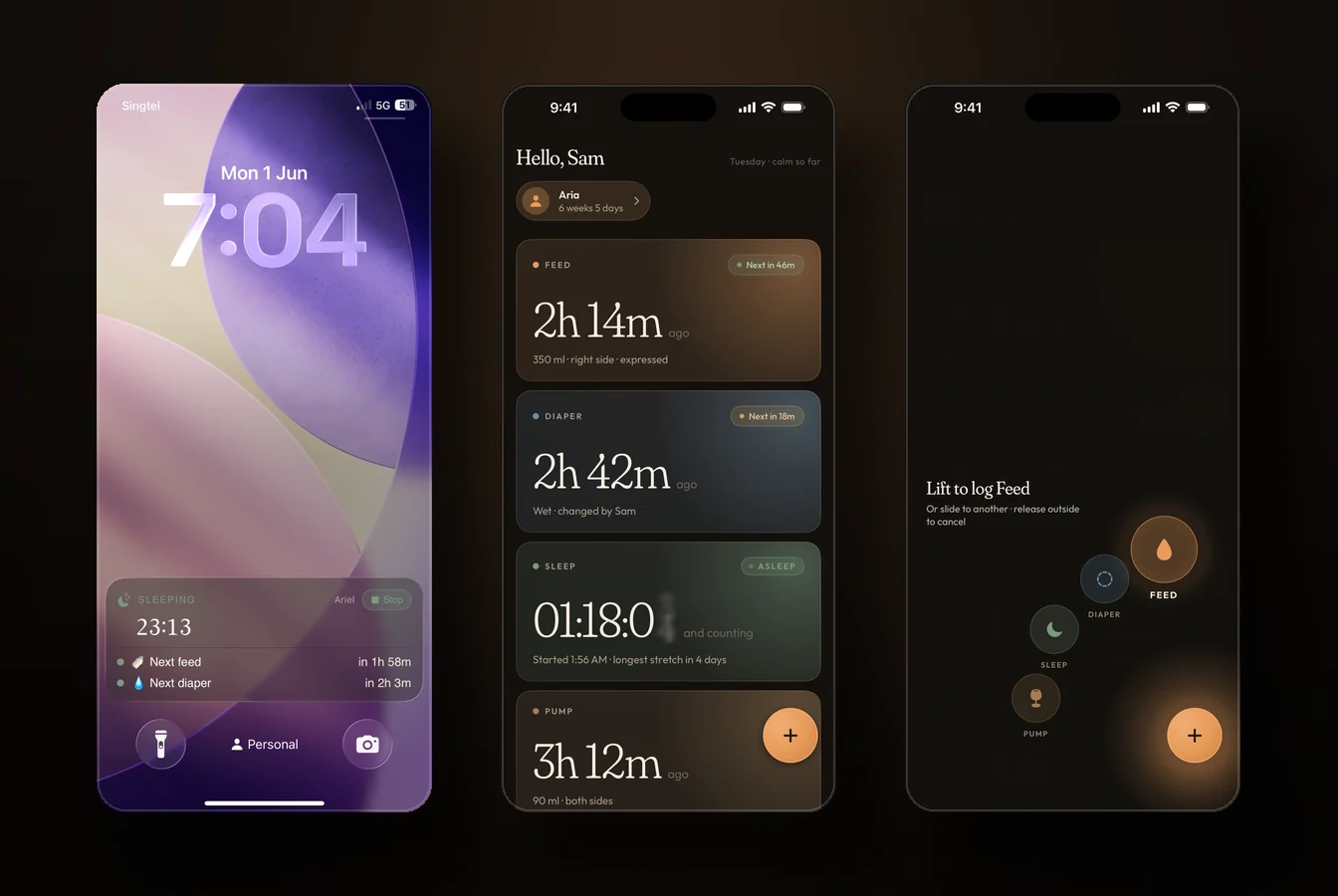
This is the one we make, so read it with that in mind. One Baby is built on a different premise than everything else here. Every other app in this comparison is a logbook you open to check on things. One Baby’s whole idea is that you mostly shouldn’t have to open it.
You log a feed or a nap, and the time until the next one counts down on your lock screen, in the Dynamic Island, on your Apple Watch complication, and in the Mac menu bar. The number sits where your eyes already are. So when your partner asks “when’s the next feed,” the answer is already on the screen in your hand, and neither of you has to go digging.
A logbook answers “what happened,” which most of these apps do well. But the question a tired parent asks forty times a day is “when’s the next thing,” and answering that by opening an app, finding the last entry, and doing arithmetic half-asleep is the small repeated tax nobody talks about. Moving that one number to the surface you’re already looking at is the whole product. Logging exists to feed it.
The scope is narrow on purpose: Apple-only, iOS 18 and up, watchOS 11, and Mac, with no Android version, ever, and a single baby by design. It doesn’t predict naps like Huckleberry or Napper, run daycare dashboards like Baby Connect, or keep immunization records like Sprout. If you need any of those, one of the apps below is your answer. What it does carry is one-handed hold-and-drag logging, iCloud sharing with no account to create, and it’s free with no ads, no analytics, no in-app purchases. The calm is deliberate. The overdue state turns a soft terracotta, never an alarming red, because this is a baby, not a fire.
Best for: the all-Apple household that wants ambient awareness over a logbook, and a low-anxiety tracker that doesn’t reward obsessive logging. Not for Android users, multi-baby families, or anyone who needs predictions or a web dashboard.

Best for sleep predictions: Huckleberry
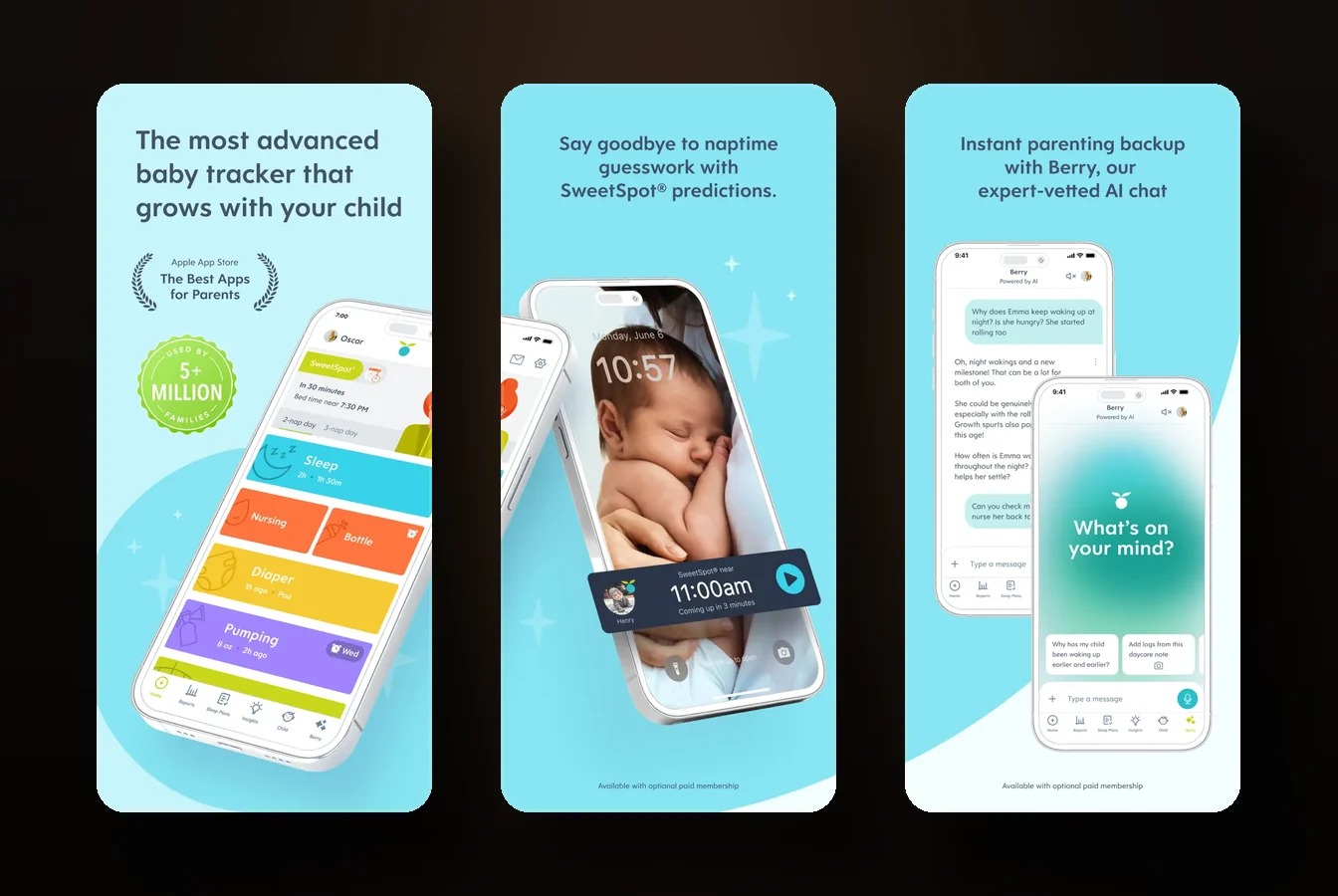
Huckleberry is the app people mean when they say “the one that tells you when to put the baby down.” Its SweetSpot feature predicts the next nap window from your logged data, and for a lot of sleep-deprived parents that single feature is worth the price.
It tracks everything: sleep, feeding, diapers, growth, milestones, multiple children. Paid tiers add custom sleep plans written against your baby’s logs plus a “Berry” AI chat. It runs on iOS and Android with a real Apple Watch app, Widgets, and Live Activities, though the Watch and Widgets sit behind a subscription. There’s a free tier with logging and sync, then Plus around $11.99/mo and Premium around $14.99/mo, where the sleep plans and Berry live, with a 14-day trial.
Two things worth knowing. The paywall creeps, so the features that made you download it tend to end up behind the subscription. And Huckleberry’s iOS data label says your data is linked to your identity and used to track you across other companies’ apps and websites. For a baby app, that’s worth knowing before you feed it your child’s sleep data.
Best for: the parent deep in the sleep-training weeds who wants a prediction engine plus a plan, and doesn’t mind paying for it.

Best free and ad-free: Nara Baby
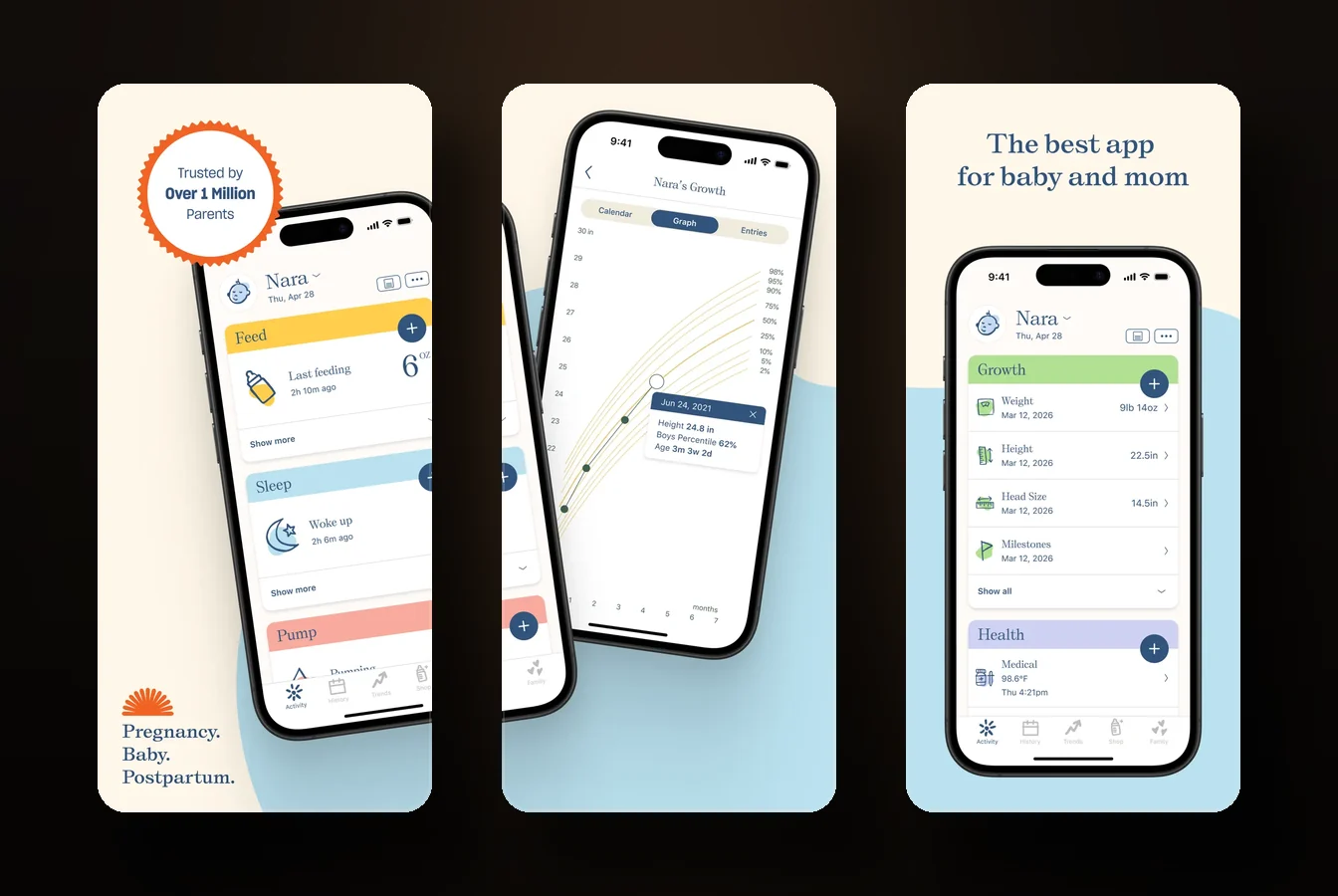
If you want a clean, capable tracker that costs nothing and doesn’t nag you to upgrade, Nara Baby is the easy recommendation. No ads, no in-app purchases, no subscription. That holds up.
It covers feeding, diapers, sleep with wake windows and a timer, solids, growth, milestones, twins and multiple children. On the Apple side it’s strong: a Watch app with timer and complication, widgets, Live Activity and Dynamic Island, and Siri logging. Sharing works by inviting your partner to one account with real-time sync.
The thing to know is the business model behind “free forever.” Nara is VC-backed and its app feeds an organic-formula business, which is how a polished, ad-free tracker stays free. Your data is cloud-synced to an account, not stored locally. Not a scandal, just the trade you’re making, and worth knowing you’re making it.
Best for: the budget-conscious parent in the Apple ecosystem who wants clean, free, ad-free tracking with a good Watch and widget setup and easy sharing.

Best for multiple caregivers and daycare: Baby Connect
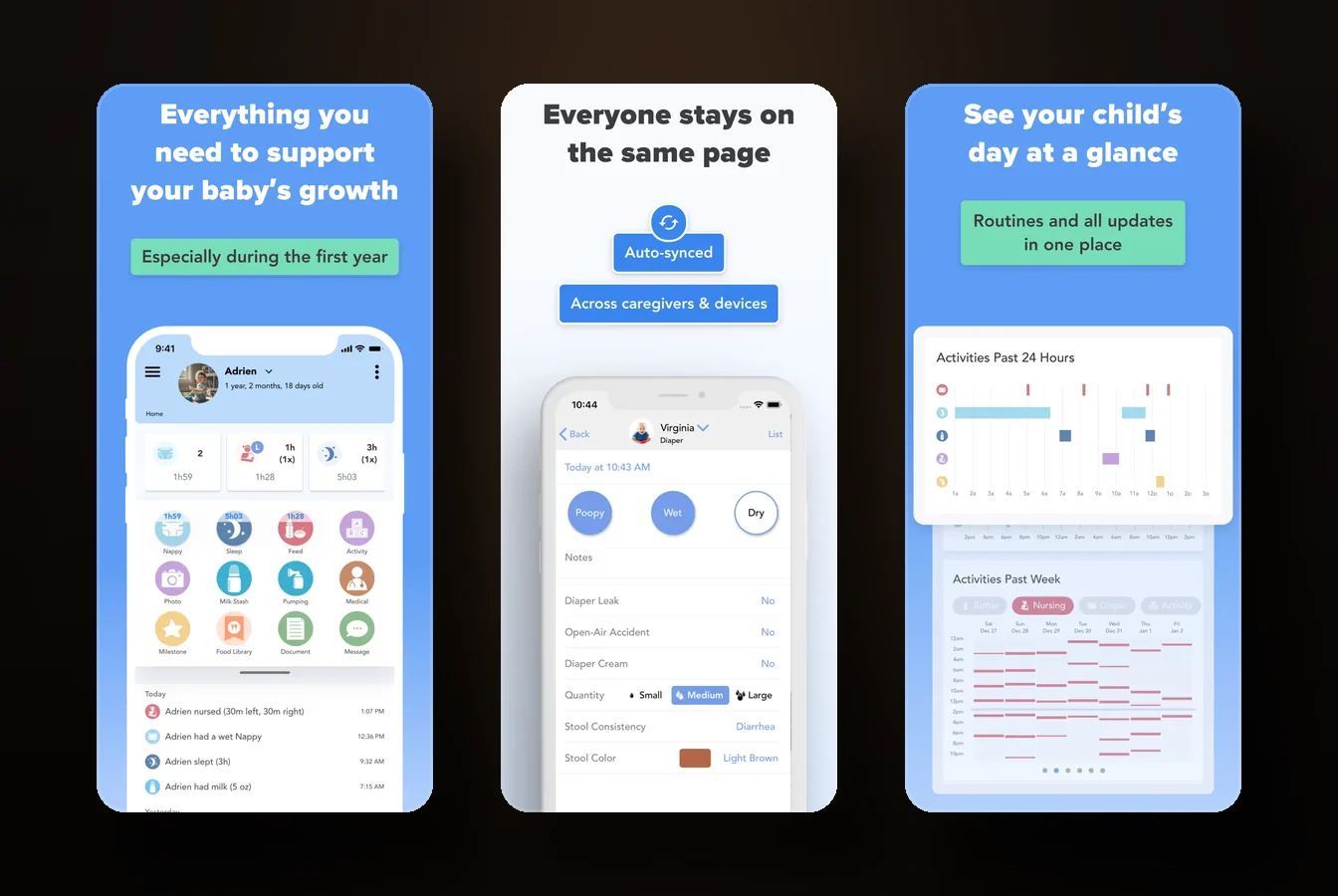
When the people logging your baby’s day include a partner on an iPhone, a nanny on Android, and a daycare that hands you a sheet at pickup, you need something built for that. Baby Connect is the deepest multi-caregiver tool here, and the strongest pick for two parents who aren’t on the same platform.
Its strength is real-time sync across platforms with per-caregiver access levels, so an iPhone parent and an Android nanny share one log. It also tracks the widest set of anything here: feeds, sleep, diapers, growth charts, meds and vaccines, immunization records, doctor visits, and a hundred-plus activities. There’s a web dashboard, which almost nobody else offers, plus Siri and Alexa.
Pricing changed and longtime users aren’t happy. It’s now a free download with a subscription after a 7-day trial, and entries stop saving without the sub. The Family plan, up to five kids, runs about $6.99/mo or $49.99/yr. It used to be a one-time paid app, and the switch drew a wave of “money grab” reviews. The UI is dated and tap-heavy, and an account and cloud are required with no local mode, though the stated policy is no ads and no data selling.
Best for: daycare and nanny households that need true real-time, cross-platform sync and deep exportable reports, and will pay for it.
Best budget pick with a one-time price: Baby Tracker by Nighp
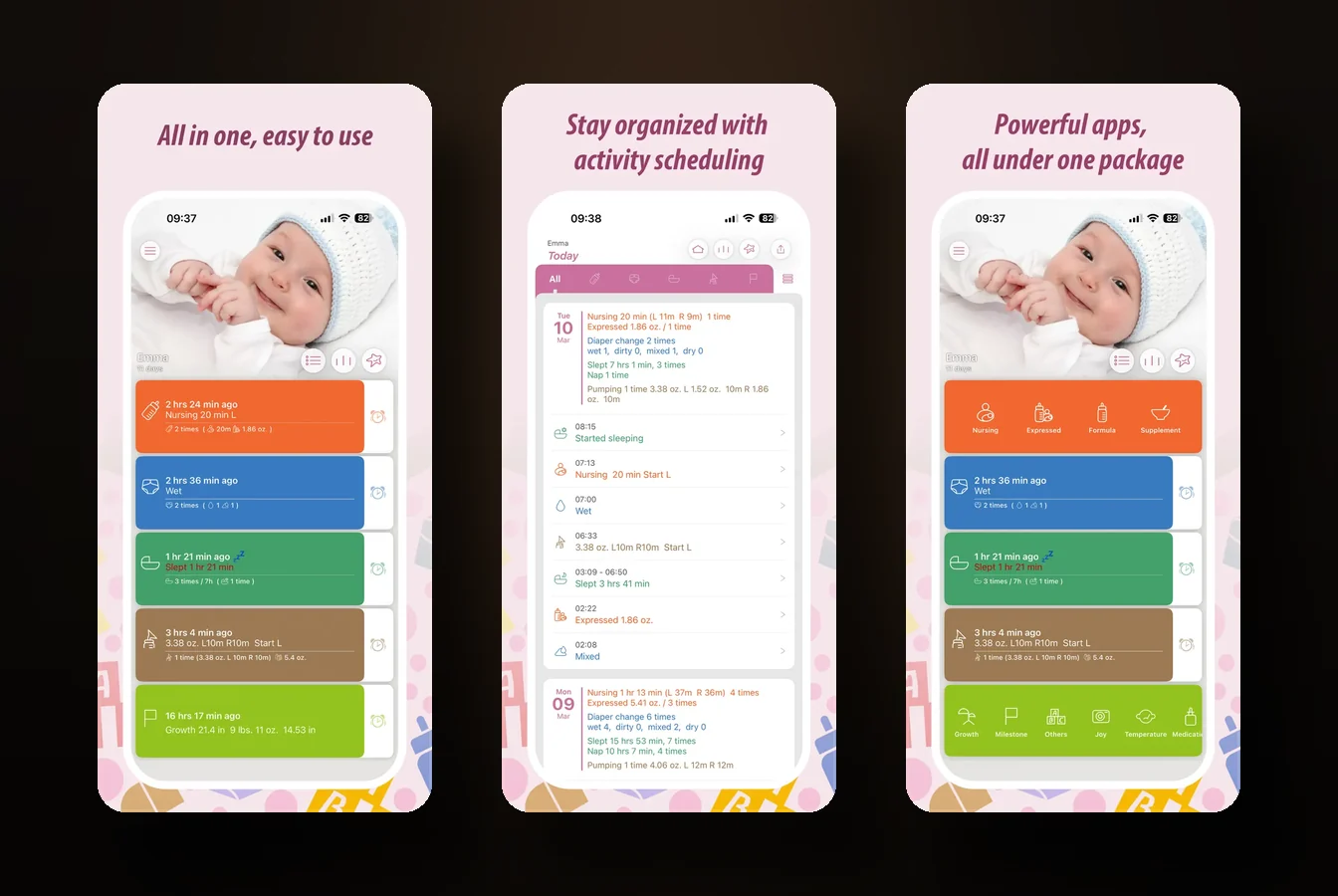
Before subscriptions ate the category, Baby Tracker by Nighp was the default free logger, and it’s still the move if you refuse to pay monthly. The full version is a one-time $4.99. No subscription.
It does fast, one-handed logging of feeding, diapers, sleep, growth with WHO percentiles, milestones, temperature, meds, and vaccines. The charts and reports are clear and genuinely useful for a doctor visit. With 227,000-plus iOS ratings at 4.8, it’s one of the most-reviewed trackers anywhere.
The catch is the free tier runs third-party ad tracking, intrusive enough that reviewers complain. The $4.99 upgrade removes the ads and unlocks the Watch app and Siri. Sharing happens through a sync group with your choice of the Nighp server, iCloud, or Dropbox, and it works offline. The Watch app is weak and the whole thing feels a little dated next to newer apps.
Best for: the budget minimalist who wants fast logging and a one-time price, and would rather pay five dollars once than subscribe to anything.
Best all-in-one with health records: Sprout
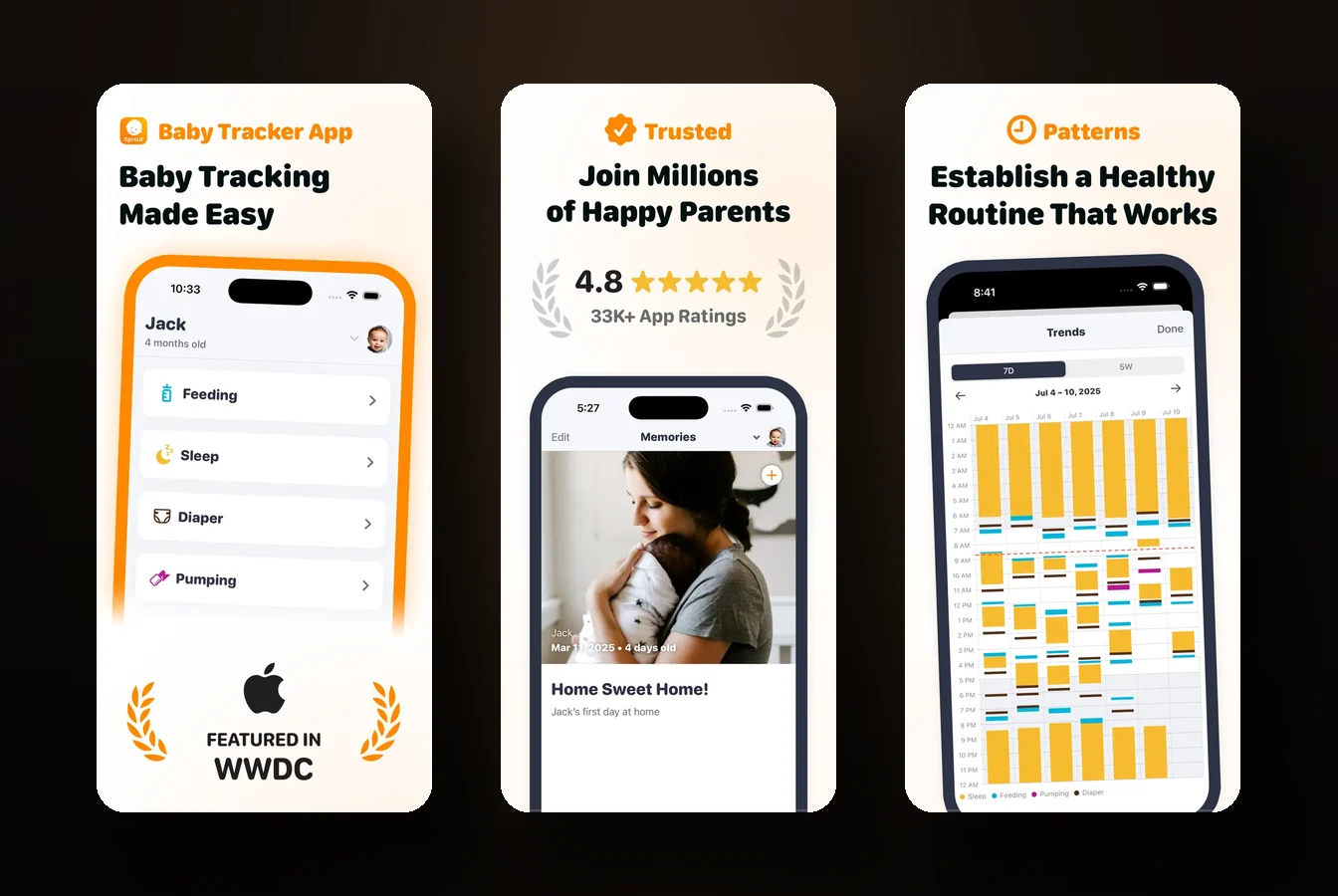
Sprout Baby Tracker is for the parent who wants one app to hold everything, including the medical side. It logs feeding, sleep, diapers, growth on both WHO and CDC charts, milestones, mood, and a full health section covering immunizations, doctor visits, meds, and reminders. It even builds an exportable photo keepsake book.
On Apple it goes deep: native iOS, Mac, and Apple Watch apps, the last with hands-free double-tap logging shown at WWDC24, plus visionOS, Android, widgets, and Live Activities. Sharing uses a PIN and invite model rather than logins, with real-time sync.
Watch two things. Pricing is murky, with duplicate App Store listings putting the live annual price somewhere around $59.99 to $89.99 depending on which one you hit, so check before subscribing. And a redesign drew sustained backlash over broken timers, lost one-handed use, and more taps. The site says “no accounts, no data selling,” but the App Store label lists data linked to your identity, so don’t take the marketing line at face value.
Best for: the all-in iOS parent who wants a single app that includes health and immunization records, Watch logging, and a keepsake.

Best big-brand option with community: Glow Baby
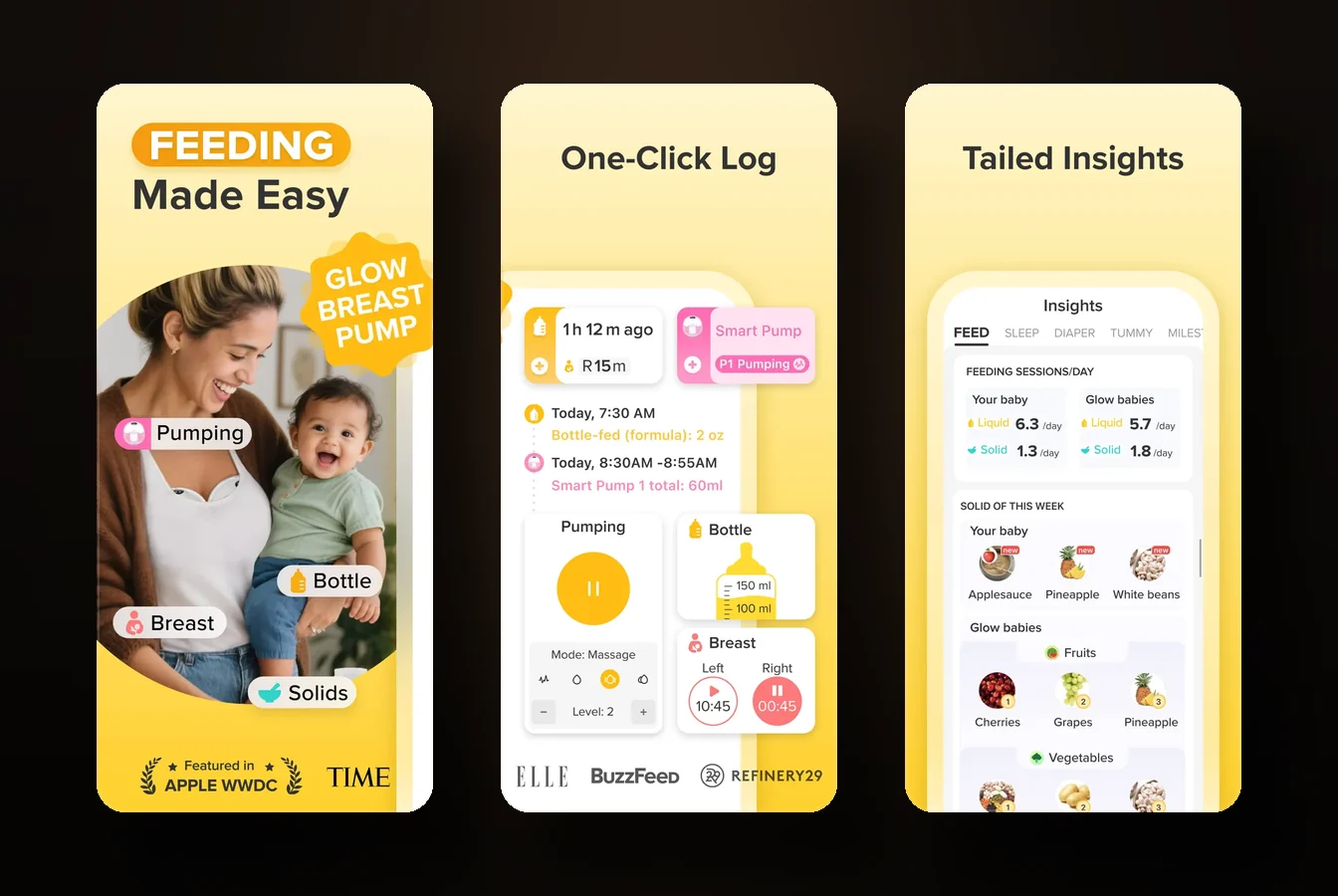
Glow Baby is the large, content-heavy option. It tracks feeding, pumping, diapers, sleep, growth, milestones, health, and activities, offers AI forecasts on its premium tier, has a big community and content library, and exports to PDF. It pairs with Glow’s own Bluetooth pump.
Pricing is freemium with a subscription, roughly $59.99 to $89.99/yr, and caregiver sharing requires the Family plan. The free tier reportedly limits how many entries you can log per day.
The history needs context. Glow’s parent company settled with the California Attorney General in 2020 over privacy issues, but that case concerned the company’s separate fertility and period app, not Glow Baby, and has since been remediated. What’s current is harder to wave off: Glow Baby’s iOS label shows data used to track you, the Android listing contains ads, and reviewers complain about ad clutter, paywall creep, sync lag, and leftover fertility-app copy in the subscription screens. Its Android rating sits at 3.9, materially lower than iOS. Weigh it.
Best for: the parent who wants community, content, and AI forecasts in a big-brand app and doesn’t mind ads. It’s the weakest of this group on privacy reputation.

Best sleep-first prediction engine: Napper
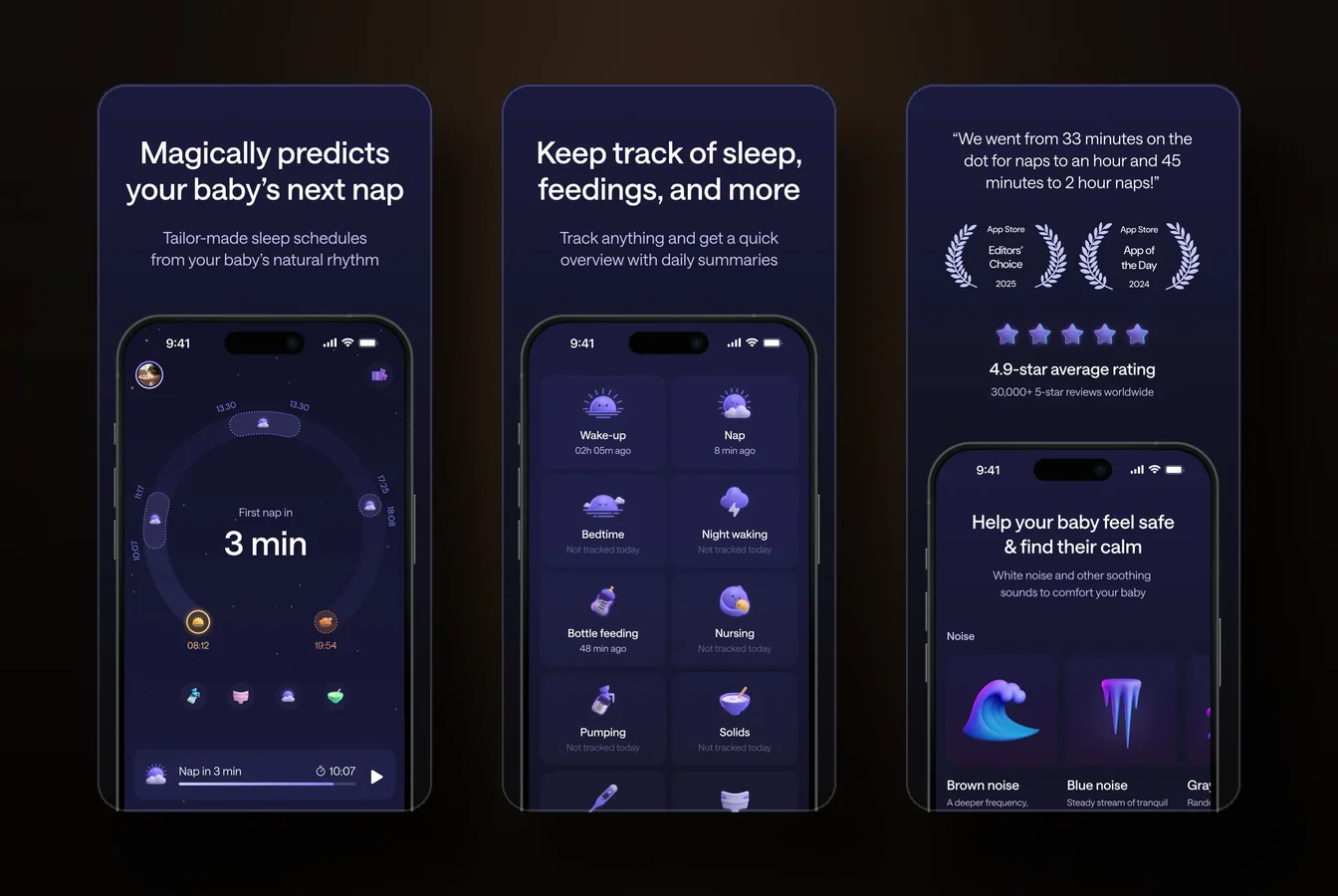
Napper is the other sleep-prediction app, and reviewers say its nap and bedtime forecasts are accurate. It auto-adjusts a wake-window schedule as your baby grows and bundles 30-plus sounds and a 14-day sleep course.
It’s built sleep-first. It logs naps and sleep as the core, plus feeding and diapers, but it’s thin as a general logbook, so don’t expect Baby Connect’s breadth. It runs on iOS, Android, Apple Watch, and visionOS, with Napper Unlimited around $69.99/yr.
Where it falls short: the predictions degrade when your baby goes off-pattern from teething or illness, which is exactly when you most want them. The price is steep for a sleep tool, two-caregiver sync has friction, and its real iOS rating count is about 4,100, not the “35,000+” you may see in marketing.
Best for: the sleep-desperate parent who wants a prediction engine and wake-window coaching, and is fine that it’s not a full logbook.

Best physical button: Talli Baby
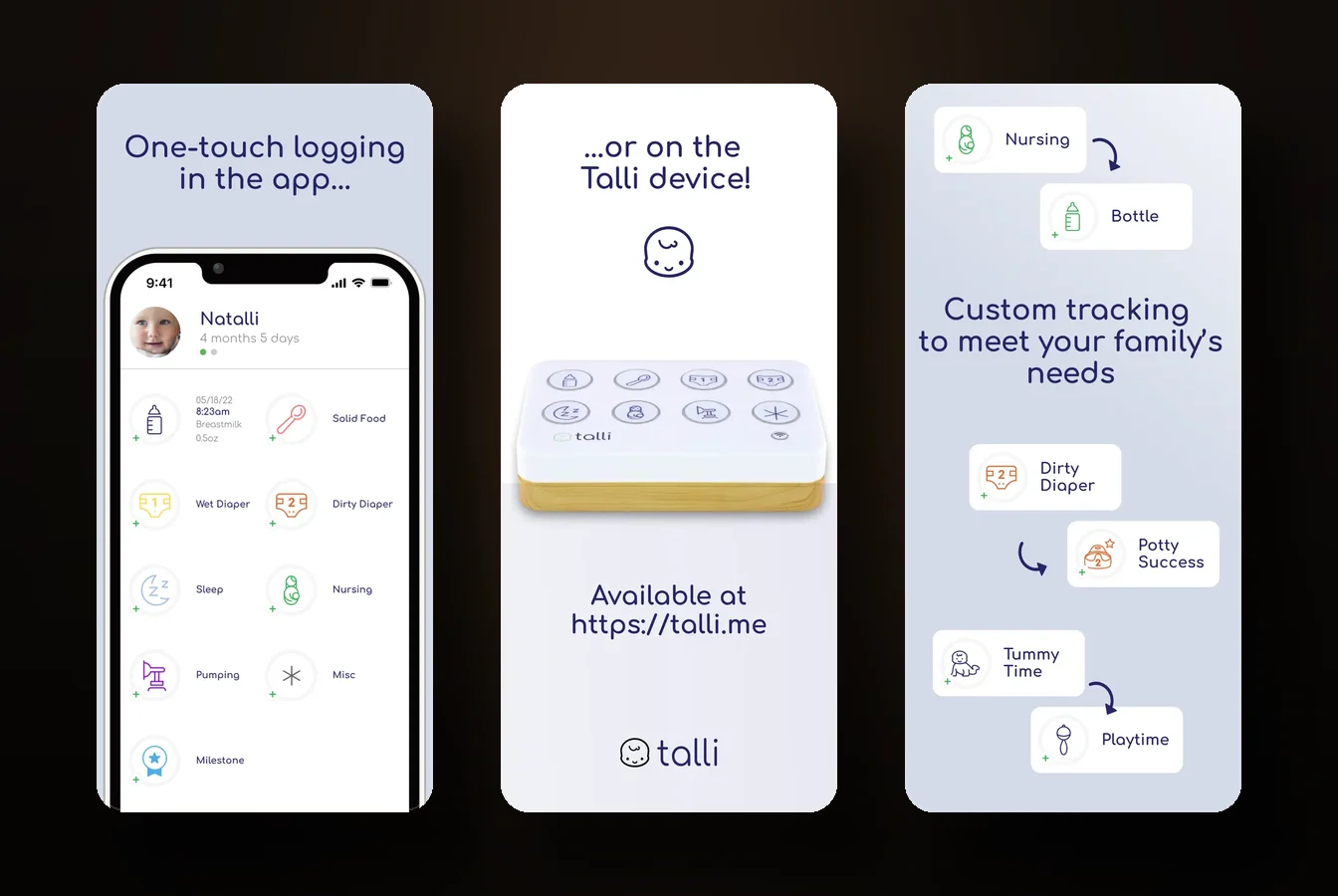
Everything else here is software. Talli Baby is a Wi-Fi connected one-touch button that sits on the counter, and for some households that physical thing is the whole point. A sitter or grandparent presses a button instead of fumbling with someone else’s phone.
The button is $109.99 for a single unit, paired with an iOS or Android app, cloud sync, and Alexa. It logs nursing with side timers, bottle, pump, solids, diapers, sleep and wake, growth, and photo milestones, with real-time multi-caregiver sync. There’s no Apple Watch app, no widgets, no Live Activity, which reviewers keep asking for, and no web dashboard.
Two catches. The app’s premium tier is $3.99/mo or $39.99/yr on top of the hardware, and some buyers resent a subscription after buying a device. And the iOS app was last updated in September 2024, so factor that into how actively you expect it developed. The device is cloud-dependent with no local mode, and ships to the US only.
Best for: rotating-caregiver households that want a physical button press, and are fine with a cloud-only, Watch-free setup.
A couple worth a mention
 Cubtale is a genuine value pick for multi-caregiver households. Parents, grandparents, and consultants share one real-time dataset, and it offers cheap optional hardware buttons, with a newborn bundle around $129 as a less expensive alternative to Talli. iOS and Android, freemium, well-rated.
 Ovia Parenting is the one to check if your employer or health plan offers it. The consumer app is free and logs the basics with caregiver sharing, and clinical features unlock through an employer or health-plan benefit. If it’s covered, worth a look before you pay for anything else.
How to actually choose
Strip away the feature lists and it comes down to three questions.
Do you want a tracker, or a tracker that coaches? A plain logbook like Nighp or Nara records what happened and stays out of your way. A coaching app like Huckleberry or Napper predicts and prescribes. Coaching costs more and can breed prediction anxiety, where you trust the app’s guess over the baby in front of you. Know which one you want before you pay.
What’s the real cost over 18 months? A subscription at $69.99/yr is roughly $105 over the stretch you’ll actually use a baby tracker. A one-time $4.99 or a free app is the rest of that in your pocket. Sometimes the prediction engine is worth it. Often the free app does the job. Do the multiplication.
Do you want to open the app, or not? Almost no comparison asks this. If checking the app is fine, any of these works. If the part you dread is opening something to find out when the next feed is, that points you toward ambient features: widgets, a Watch complication, a number on the lock screen. Pick for the friction you actually feel, not the feature list that looks most complete.
Frequently asked questions
Is there a free baby tracker app? Yes. Nara Baby is genuinely free with no ads and no in-app purchases. Baby Tracker by Nighp is free with ads, or $4.99 once to remove them. One Baby is free with no ads, no analytics, and no purchases. Others, like Huckleberry and Baby Connect, have free tiers but gate their best features behind a subscription.
Can you share a baby tracker app with your partner? Most of them, yes, though the details vary. Nara, Huckleberry, and Baby Connect all support real-time multi-caregiver sync, with Baby Connect strongest for cross-platform households where one of you is on Android. Glow requires its paid Family plan to add caregivers. One Baby shares through iCloud with no separate account to set up, which suits two iPhones in the same household.
What is the best baby tracker app for Apple Watch? For a free option, Nara Baby has a solid Watch app with a timer and complication. Sprout offers native hands-free double-tap logging on the Watch. Huckleberry has a real Watch app, though it’s gated behind a subscription. If you want the next feed counting down on your Watch face rather than a logging button, One Baby is built around exactly that.
Which baby tracker has no subscription? Baby Tracker by Nighp is a one-time $4.99 with no subscription. Nara Baby and One Baby are free with no subscription at all. Most of the rest, including Huckleberry, Baby Connect, Napper, Glow, and Sprout, now run on subscriptions for their full feature set.
The short version
The best baby tracker app is the one that fits the need you actually have. Want sleep predictions, go Huckleberry or Napper. Want free and clean, go Nara. Juggling a nanny and daycare, go Baby Connect. Want a physical button, Talli. Want one app for everything including health records, Sprout.
And if the thing you’re tired of is opening an app to find out when the next feed is, that’s the gap One Baby was built for. You set the feed or nap rhythm, shorter intervals by day, stretched at night for sleep training, and the countdown carries it on your lock screen and Apple Watch. So you can glance instead of calculate, and stop doing math half-asleep.
Whichever you pick, pick for the friction you feel at 3am, not the longest feature list. Then mostly put the phone down.